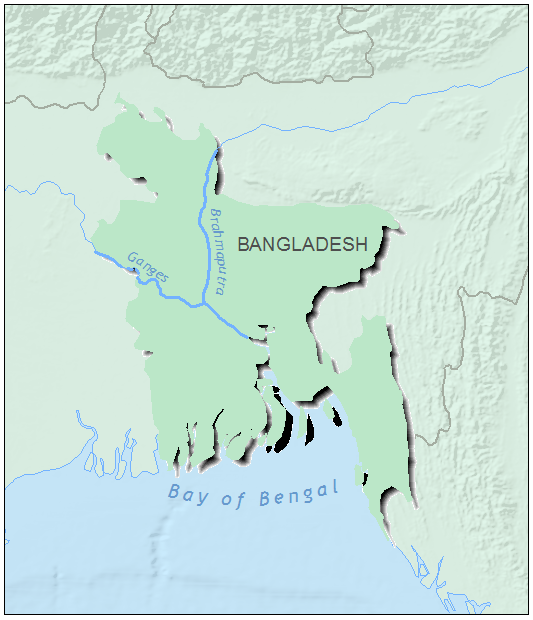
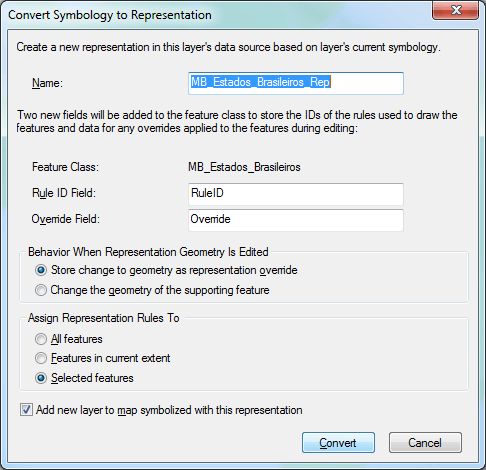
drop shadow) is to use cartographic representation. Basically, two steps are needed to create this effect:1 - Convert a selected feature class into a cartographic representation (Figure 1)
2 - Apply the MOVE EFFECT to the representation.
To start, add the feature class to ArcMap (this only works with feature classes stored in a geodatabase);
- Select the polygon you want to highlight and right-click to choose “Convert Symbology to Representation…”
- Figure 1: Converting to Representation
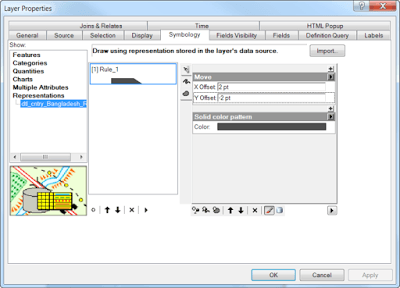
- Click the + symbol and add a MOVE EFFECT
- Set X Offset to 2pt and Y Offset to -2pt. See Figure 2 and the result in Figure 3.
- If you want to change and test other effects, add the Representation toolbar to your workspace and try all available options.
- Figure 2 – Representation setup for the drop shadow effect.