A map can become much more professional with a simple checklist. The website exprodat.com published a helpful list, and we have adapted it here with a few practical comments.
For U.S. GIS and forestry professionals: this article is localized from Brazilian Portuguese and expanded with practical U.S.-relevant guidance. When legal or technical terms are Brazil-specific, a brief note explains the U.S. equivalent.
We adapted the list below and added context for U.S. workflows. Before plotting your map, check these 10 items:
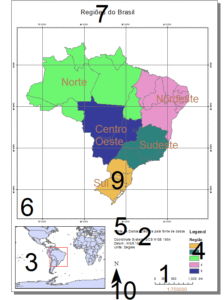
1-Scale bar and scale text.
It cannot be missing and must be compatible and the divisions must be useful for the end user;
2-Geodetic information.
Projection, datum, spheroid, ellipsoid and even EPSG when possible should be added;
3- Location map or extension indicator.
Very important to show the context where your map is inserted, important for those who don't have much skill in reading a map;
4-Legend and Symbols.
They cannot be missed. Try to group points, lines and polygons from the same context and ensure that nothing visible is missing from the legend;
5-References and Citations.
Including copyright and data source information is a very important practice that adds professionalism to the work;
6-Grids and Squares.
Important but, for it to work well, pay attention to the spacing between lines, use crosses only on large scale maps.
A tip is to use a grid line on A4 sheets every 4 to 6 cm, A3 6 to 8 cm and A0 one every 14 to 16 cm;
7-Font Size.
According to GIS consultant (ESRI UK) Dhowal Dalal, a good tip is to avoid using very large fonts that take attention away from the map data itself:
Try to follow these font size suggestions or proportional to these (in pt):
| Sheet | Source and Copyright | Legend, scale and geodetic data | Title | North Arrow | Square | UTM Grid |
|---|---|---|---|---|---|---|
| A4 | 4 | 6 | 8 | 40 | 6 | 4 |
| A3 | 6 | 8 | 10 | 80 | 8 | 6 |
| A0 | 10 | 10 | 14 | 150 | 12 | 10 |
8-Spelling correction.
ArcGIS/QGIS does not have a spell checker, so always check and correct any spelling errors you find; ArcGIS PRO has a spell checker, which makes this task much easier.
9- Labels.
Check if all labels are visible and if they are really necessary. Too many labels can make the map difficult to understand. Use modern grouping techniques andkey numberingavailable onMaplex Label Enginein ArcMap and PRO;
10-Map orientation.
Although many cartographers believe that it is no longer necessary to include a north arrow due to the vast majority of maps having a north orientation by default, it is still recommended to do so. You can also rotate theDataFrameto better organize the data on the sheet and then the north arrow will be essential to indicate this rotation to the map reader.
Now, after checking all the steps above, go ahead and plot your map or convert it to PDF.
Adapted fromhttp://www.exprodat.com